
How to Check Minority Card Status
How to check Minority Card status is one of the most searched queries among beneficiaries who want to confirm their quarterly payment. The Punjab government has made this process simple by introducing an online system where applicants can verify whether their payment is approved, pending, or transferred. This helps families stay updated without visiting offices.
The online tracking system is especially useful for managing household expenses, as beneficiaries can instantly know if their PKR 10,500 payment has been processed. By using CNIC-based login, the process of how to check Minority Card status has become fast, secure, and accessible for everyone.
- Check payment status online anytime
- No need to visit government offices
- Instant updates through portal
- Secure CNIC-based verification
You Can Also Read: How to Apply for Punjab Free Google Courses 2026 – Complete Step-by-Step Guide
What Is Minority Card Status Checking System?
The Minority Card status checking system is a digital platform that allows applicants to track their financial assistance. Once a person applies and gets verified through PMT score and eligibility criteria, their payment details are uploaded into the system for monitoring.
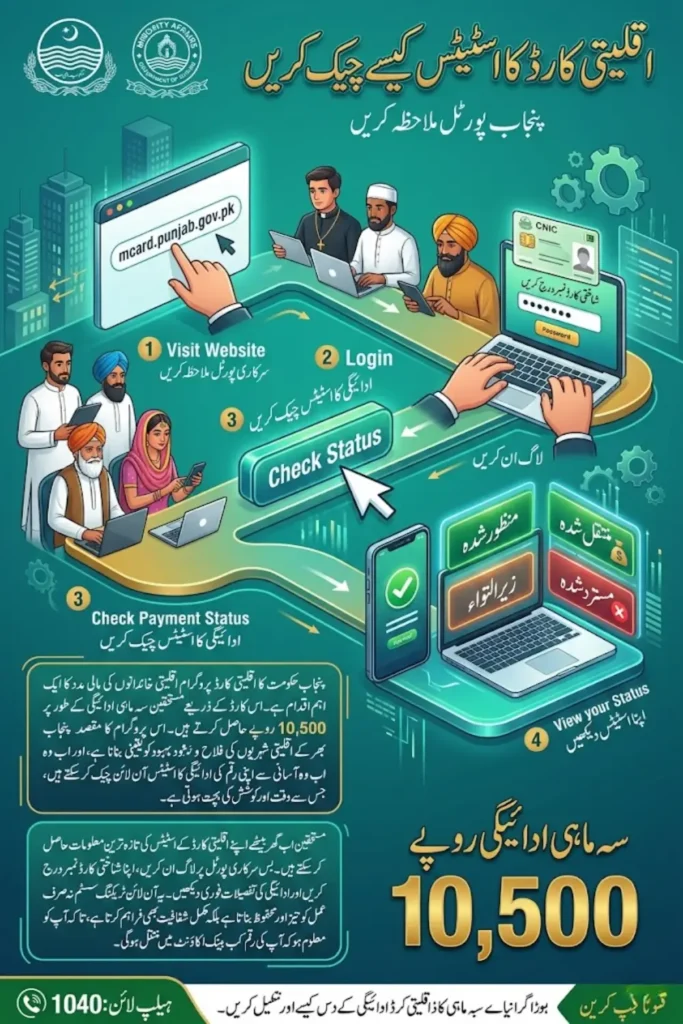
This system ensures that payments are transferred directly into the applicant’s bank account without delays or third-party involvement. It also improves transparency, as users can clearly see their application and payment progress online.
- Digital verification of applicants
- Direct bank transfer system
- Transparent monitoring process
- Real-time status updates
You Can Also Read: AI Seekho 2026 Registration – Free AI Training Program in Pakistan
How to Check Minority Card Status Online Step-by-Step
If you are wondering how to check Minority Card status, the process is very simple and can be completed in a few steps. The official portal allows users to log in and view their payment details within seconds.
Before checking your status, make sure your CNIC and bank details are correct to avoid any errors. Following the correct steps ensures that you get accurate and updated information about your payment.
- Visit official website (mcard.punjab.gov.pk)
- Enter CNIC and password to login
- Click on “Check Payment Status”
- View your current payment status
Minority Card Status Types Explained
When learning how to check Minority Card status, it is important to understand the different status categories shown on the portal. Each status reflects a stage of your application or payment process.
For example, “Approved” means your payment is ready, while “Transferred” confirms that the money has been sent to your bank account. Knowing these statuses helps you take the right action if needed.
| Status | Explanation |
|---|---|
| Approved | Payment verified and scheduled |
| Transferred | Amount sent to bank account |
| Pending | Still under verification |
| Rejected | Not eligible or incomplete details |
- Approved means eligible for payment
- Transferred means payment received
- Pending shows process is ongoing
- Rejected needs correction
You Can Also Read: FBISE Last Date of Admission HSSC 2026 – Revised Schedule, Fee Details and Complete Online Process
Eligibility for Minority Card Status Check
To understand how to check Minority Card status, you must first meet the eligibility criteria. Only those applicants who qualify under the government rules can access payment updates and receive financial assistance.
The scheme is designed for minority families living in Punjab with limited financial resources. Applicants must meet all conditions to ensure successful approval and smooth payment processing.
- Resident of Punjab
- Belong to minority community
- PMT score 45 or below
- Not receiving BISP or PSPA aid
Common Problems While Checking Minority Card Status
Many users face issues when trying to learn how to check Minority Card status due to incorrect information or technical errors. These problems can delay payment confirmation or show incorrect status.
To avoid such issues, it is important to keep your documents updated and verify your details regularly. If problems continue, you can contact the official helpline for assistance.
| Problem | Solution |
|---|---|
| Wrong CNIC details | Update CNIC information |
| Bank account issues | Provide correct account details |
| Status not showing | Re-login or check later |
| Payment delay | Contact helpline 1040 |
- Keep CNIC updated
- Ensure active bank account
- Double-check login details
- Contact support if needed
You Can Also Read: HEC National Skill Competency Test Registration (NSCTR )2026 – Deadline, Test Date and Complete Student Guide
Benefits of Checking Minority Card Status Online
Understanding how to check Minority Card status online offers many benefits for applicants. It saves time, reduces confusion, and provides direct access to payment information without any middleman.
This system also improves financial planning, as families can track when their payment will arrive. The digital process ensures transparency and builds trust in the welfare system.
- Quick and easy access
- No travel or waiting time
- Transparent payment tracking
- Better financial management
Conclusion
How to check Minority Card status is now a simple and efficient process thanks to the online system introduced by the Punjab government. By using CNIC-based login, applicants can quickly verify their payment status and stay informed about their financial assistance.
Regularly checking your status ensures that you do not miss any updates and can resolve issues on time. This system makes financial support more transparent, reliable, and accessible for minority families.
You Can Also Read: How to Apply for FIA Jobs in Pakistan – Complete Step-by-Step Guide 2026
FAQs
1. How to check Minority Card status online?
Visit the official portal, log in with your CNIC, and check your payment status.
2. What does “Transferred” mean in Minority Card status?
It means your payment has been sent to your bank account.
3. Why is my Minority Card status pending?
It means your application is still under verification.
4. Who can help if I cannot check my status?
You can contact helpline 1040 or visit the nearest office.
You Can Also Read: Toyota Corolla vs Honda Civic Sedan 2026 – 9 Major Upgrades in Engine, Fuel Efficiency & Performance Insights