IRIS FBR Official Portal
IRIS is an online tax management system used by the Federal Board of Revenue in Pakistan. It helps individuals and registered businesses complete various income tax tasks without visiting an FBR office for every transaction.
The portal is designed to make tax registration, return filing, and account management more convenient. Users can access their tax records, submit required forms, and review the status of their submissions through their accounts.
Main Services Available on IRIS
The official IRIS portal provides access to several tax-related services, including:
- Online income tax registration
- Income tax return filing
- Taxpayer account access
- Password recovery
- Tax return revision
- Tax payment and verification services
- Access to relevant tax records and submitted forms
Some services may require additional information or separate verification. The available options can also depend on your taxpayer category and registration status.
How to Open the Official IRIS FBR Login Page
Before entering your CNIC or password, make sure you are using the official FBR website. Avoid websites that imitate the government portal or ask for unnecessary personal information.
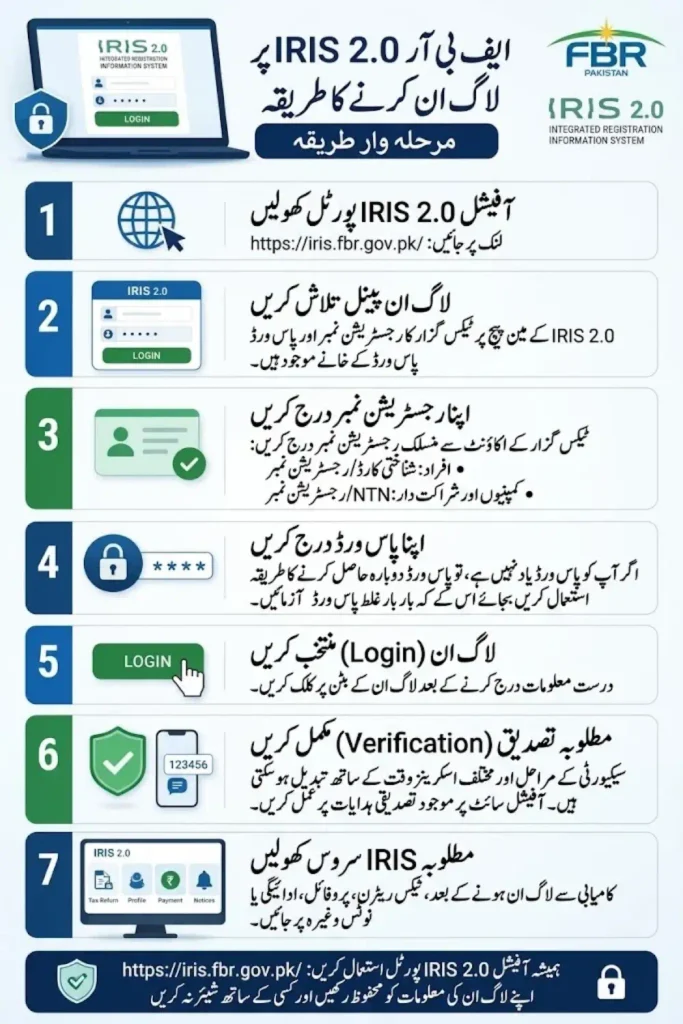
Follow these simple steps to access IRIS:
- Open your preferred web browser.
- Visit https://iris.fbr.gov.pk/.
- Locate the login section on the portal.
- Enter your registration number and password.
- Complete any requested security verification.
- Select the login option to access your account.
If you are using IRIS for the first time, you may need to complete registration before logging in. Existing taxpayers who have an NTN but no IRIS login credentials may need to use the e-enrollment option.
IRIS FBR Registration for New Taxpayers
New taxpayers can register online through IRIS if they meet the requirements for individual registration. FBR provides online registration for individuals, while companies and associations of persons may need to follow a different registration process.
Registration is important because it establishes your taxpayer profile and provides the credentials needed to access the online tax system.
Documents Required for IRIS Registration
Prepare the required information before starting your application. Depending on your situation, you may need the following:
- Valid CNIC
- Mobile number registered against your CNIC
- Personal email address
- Personal bank account maintenance certificate
- Business address and details, if applicable
- Proof of ownership or tenancy for business premises, if applicable
- Recent paid utility bill for business premises, if applicable
Not every applicant needs every document. Requirements depend on your circumstances and the instructions displayed during registration.
Step-by-Step IRIS Registration Process
Follow these steps to begin individual registration:
- Visit the official IRIS website.
- Select the registration option for an unregistered person.
- Enter the requested personal information.
- Provide your CNIC and contact details.
- Complete the required verification steps.
- Enter any additional information requested by the portal.
- Upload the required documents.
- Review your information carefully before submission.
After submitting your application, follow any further instructions provided by FBR. Keep your registered mobile number and email accessible because they may be needed for verification and account communication.
Registration does not automatically mean that every tax obligation has been completed. You may still need to file the relevant income tax return.
How to Log In to IRIS FBR?
Once your registration or e-enrollment is complete, you can use your login credentials to access your taxpayer account.
The login process is straightforward:
- Open the official IRIS portal.
- Enter your registration number.
- Type your password.
- Complete any required verification.
- Select Login to open your dashboard.
For an individual Pakistani taxpayer, the CNIC without dashes is generally used as the registration number. Companies and associations of persons use the relevant NTN or registration number issued to them by FBR.
After logging in, review your dashboard for pending tasks, submitted forms, notices, and available tax services.
How to File an Income Tax Return on IRIS
Filing an income tax return involves reporting the relevant income, expenses, assets, and tax payments for the applicable tax year. The information required depends on your income sources and taxpayer category.
Before starting, gather your salary records, bank information, business income details, withholding tax certificates, and other relevant documents.
Steps to File Your Tax Return
- Log in to your IRIS account.
- Open the Declaration section.
- Select the relevant income tax return option.
- Choose the applicable tax period.
- Enter your income and other required information.
- Complete the relevant sections of the return.
- Enter eligible tax payments and withholding tax credits.
- Review the figures and calculate the return.
- Complete the wealth statement if required.
- Submit the return after checking all details.
The exact form and sections may vary depending on your taxpayer category and the tax period. Follow the current instructions shown in IRIS and consult a qualified tax professional if your financial situation is complex.
Information to Check Before Submission
Mistakes in a tax return can lead to notices, correction requests, or other compliance issues. Review your information carefully before submitting.
Pay particular attention to:
- Correct tax year
- Total annual income
- Salary or business income
- Bank profit and other income, where applicable
- Tax already deducted at source
- Eligible tax credits or payments
- Assets and liabilities
- Wealth statement reconciliation, where required
Make sure your declared income and assets are consistent with your available records. Do not enter estimated figures as confirmed amounts when accurate information is available.
What Is a Wealth Statement in IRIS?
A wealth statement reports relevant assets, liabilities, and changes in wealth for the applicable period. It helps explain how a taxpayer’s financial position changed during the year.
Depending on the applicable requirements, the information may include bank balances, property, vehicles, investments, cash, liabilities, and personal expenses.
When completing a wealth statement:
- Use accurate asset values based on available records.
- Include relevant liabilities.
- Check opening and closing wealth figures.
- Account for income and expenses appropriately.
- Review the reconciliation before submission.
Not every taxpayer has identical filing requirements. Check whether a wealth statement is required for your circumstances and tax year before submitting your return.
How to Pay Income Tax Through IRIS
If your completed return shows tax payable, you may need to generate a payment slip and pay the amount through an available payment channel.
FBR provides electronic payment services for eligible tax payments. The exact process depends on the tax type and the payment facility available for your case.
A general payment process may include:
- Open the relevant payment section.
- Select the appropriate tax type.
- Enter the required payment details.
- Generate the applicable Payment Slip ID (PSID), where required.
- Pay through an authorized payment channel.
- Keep the payment confirmation.
- Check the payment status using the relevant official verification service.
Always confirm the tax period and amount before making a payment. Keep your Computerized Payment Receipt (CPR) or other official proof of payment for your records.
How to Recover a Forgotten IRIS Password
Forgetting your IRIS password does not necessarily mean you need to register again. The portal provides an account recovery process for taxpayers who cannot access their accounts.
To recover your password:
- Open the official IRIS login page.
- Select Forgot Password or the account recovery option.
- Enter the requested CNIC or registration number.
- Provide the required registered contact information.
- Complete the verification steps.
- Follow the instructions to set a new password.
FBR may send verification codes to your registered email address or mobile number. If you cannot access these details, follow the official account recovery instructions or contact FBR for assistance.
Never share your password or verification codes with someone claiming they can recover your account for a fee.
How to Check Your Taxpayer Status Online
IRIS provides access to tax-related services, while the FBR website also offers online verification tools. These tools can help taxpayers check certain records without logging into their accounts.
Available verification services include the Income Tax Active Taxpayer List, taxpayer profile inquiry, and other tax-related verification options.
To check your active taxpayer status:
- Open the official FBR website.
- Access the Active Taxpayer List verification service.
- Select the relevant identification type.
- Enter the requested information.
- Complete the displayed verification.
- Review the result.
You can start from the official IRIS portal at https://iris.fbr.gov.pk/ and select the relevant online verification service.
Remember that registration, filing a tax return, and appearing on the Active Taxpayer List are different matters. Your status depends on the applicable legal requirements and the information recorded by FBR.
Common IRIS FBR Login Problems and Solutions
Taxpayers may occasionally face login errors, verification issues, or difficulties accessing forms. Many problems can be resolved by checking account details and following the official instructions.
| Problem | What to do |
|---|---|
| Incorrect password | Use the official password recovery option |
| Login not working | Recheck your registration number and password |
| Verification code not received | Confirm your registered contact details |
| Registration issue | Review the required information and documents |
| Return not visible | Check the tax period and account dashboard |
| Payment not reflected | Keep the receipt and verify payment status |
| Portal not loading | Try an updated browser and a stable connection |
If the issue continues, consult the official FBR help resources. Avoid creating duplicate accounts or submitting repeated applications without understanding the cause of the problem.
Important Tips for Safe IRIS FBR Use
Your IRIS account contains sensitive tax and identity information. Protecting your credentials is essential when registering, filing returns, or checking tax records online.
Follow these safety practices:
- Use the official FBR website.
- Keep your password private.
- Never share verification codes.
- Check the website address before logging in.
- Save copies of submitted returns and payment receipts.
- Review all information before final submission.
- Avoid public computers for sensitive tax work.
- Log out after using a shared device.
If you use a tax consultant, make sure you understand which services they are providing and retain copies of your tax documents. You remain responsible for checking that the information submitted on your behalf is accurate.
IRIS FBR Login and Tax Filing: Final Words
The IRIS FBR portal makes online income tax registration, return filing, and tax account management more accessible for taxpayers in Pakistan. With the correct documents and accurate financial records, individuals can complete many tax-related tasks online.
Start by visiting the official portal, complete registration if necessary, and use your credentials to access the account. Before filing, check your income, tax payments, and other required information carefully.
For registration rules, filing instructions, and account recovery, rely on official FBR guidance rather than unverified websites. This will help you manage your tax responsibilities more confidently and avoid common mistakes.
Frequently Asked Questions
1. What is the official IRIS FBR website?
The official portal is https://iris.fbr.gov.pk/. Use it for IRIS login, registration, and available tax services.
2. Can I register for IRIS FBR online?
Yes, eligible individuals can register online through IRIS. Companies and associations of persons may need to follow a different procedure.
3. What is the IRIS login ID for an individual?
A Pakistani individual generally uses their 13-digit CNIC without dashes as the registration number. Other taxpayer categories use their applicable NTN or registration number.
4. Can I file an income tax return without IRIS registration?
You generally need an IRIS account to file an online income tax return. First-time filers should complete the required registration process.
5. How can I reset my IRIS password?
Select the password recovery option on the official login page. Follow the verification steps using your registered contact details.
6. Can I check my Active Taxpayer List status online?
Yes, FBR provides an online verification service for income tax Active Taxpayer List status. Use the official portal to access the relevant service.
7. What should I do if my IRIS account is not working?
Check your login details and use the official recovery process if needed. If the problem continues, consult FBR’s official help resources.
8. Is IRIS FBR free to use?
The official government portal provides online tax services. However, a taxpayer may choose to pay a tax consultant for professional assistance.
9. Can I revise a submitted income tax return?
FBR provides a process for revising returns, subject to the applicable rules and requirements. Check the current IRIS instructions before submitting a revision.
10. Is it safe to share my IRIS password with a tax agent?
You should keep your password and verification codes private. If you use professional tax assistance, protect your account and review the information submitted on your behalf.
